What is Applied Scientist

Applied Scientist is an autonomous agent that runs inside Jupyter notebooks. You hand it two things, your current notebook and a research source describing a new method (a PDF paper, a blog post URL, an arXiv link, a GitHub or GitLab repository, a Kaggle notebook or dataset page, a documentation page, any other reference it can fetch, or simply a free-form idea written as plain text), and it does the work a researcher would do by hand: it reads it, runs your baseline to capture metrics, applies the method from the source, and produces a clear structured comparison of whether the new approach actually improves your model. You do not prompt it turn by turn, you do not wire the benchmark together yourself. You supply the inputs, launch the run, and read the result.
How Applied Scientist Works

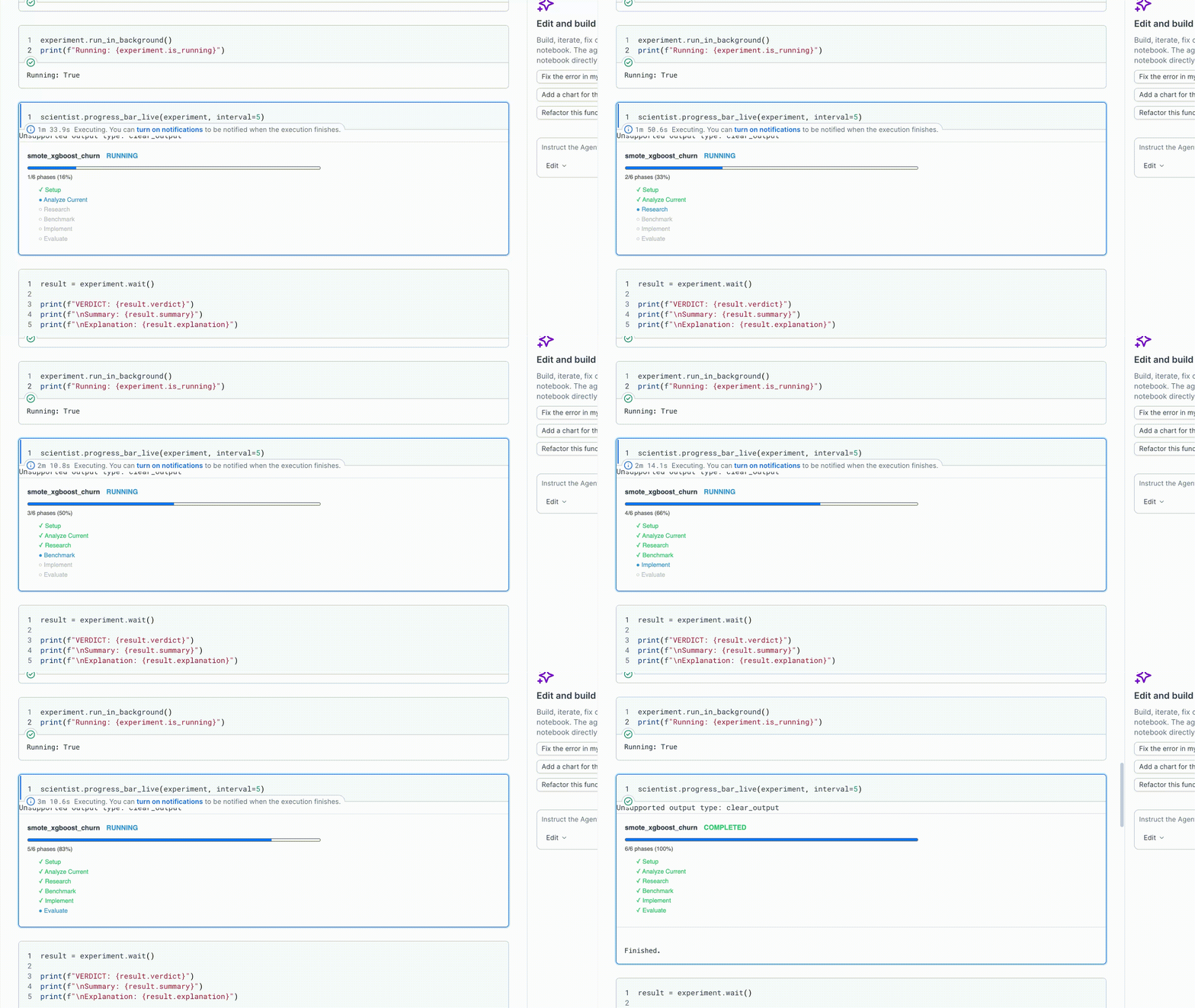
A run moves through six fixed phases, in order. Each phase has a clear job and hands off a well-defined output to the next one.

Phase 0: Setup

Prepares an isolated workspace for the experiment and materializes the current notebook, data, and research source into it without touching the originals. The research source is handled based on what it actually is: a local PDF is copied in as research.pdf, other local files (Markdown, HTML, .ipynb, text) keep their extension as research_source.{ext}, GitHub/GitLab/Bitbucket repositories are shallow-cloned into research_source/, Kaggle notebook or dataset pages are pulled down (via the Kaggle link or API) into research_source/, regular web URLs are fetched and saved as research_source.html (with the matching PDF pulled in too for arXiv-style links), and a free-form text idea is written verbatim to research_source.md. This lets all later phases operate on their own copies without putting production code at risk.

Phase 1: Analyze Current

Focuses on understanding how the existing baseline works: which model, preprocessing steps, and hyperparameters it uses, and what scores it achieves on which metrics. The goal is to clearly document the “other side” of the comparison before anything new is introduced.

Phase 2: Research

Reads the materialized research source — whether that is a PDF, a Markdown/HTML dump, a cloned repository, or a fetched web page — and digests the proposed method: what it does, what it improves, its pros and cons, and its technical requirements. It also assesses whether the method is compatible with the current data and metrics, clarifying the implementation plan.

Phase 3: Benchmark

Sets the ground rules for a fair comparison: decides which metrics will be measured on both sides and locks in the baseline values. Any metric missing from the baseline is flagged, forcing the new implementation to compute it too.

Phase 4: Implement

Brings the paper’s method to life in a new notebook using the same data, the same train/test split, and the same random seed as the baseline. It runs the notebook end-to-end and measures every metric defined in Phase 3. The aim is a comparable result, not a production-grade model.

Phase 5: Evaluate

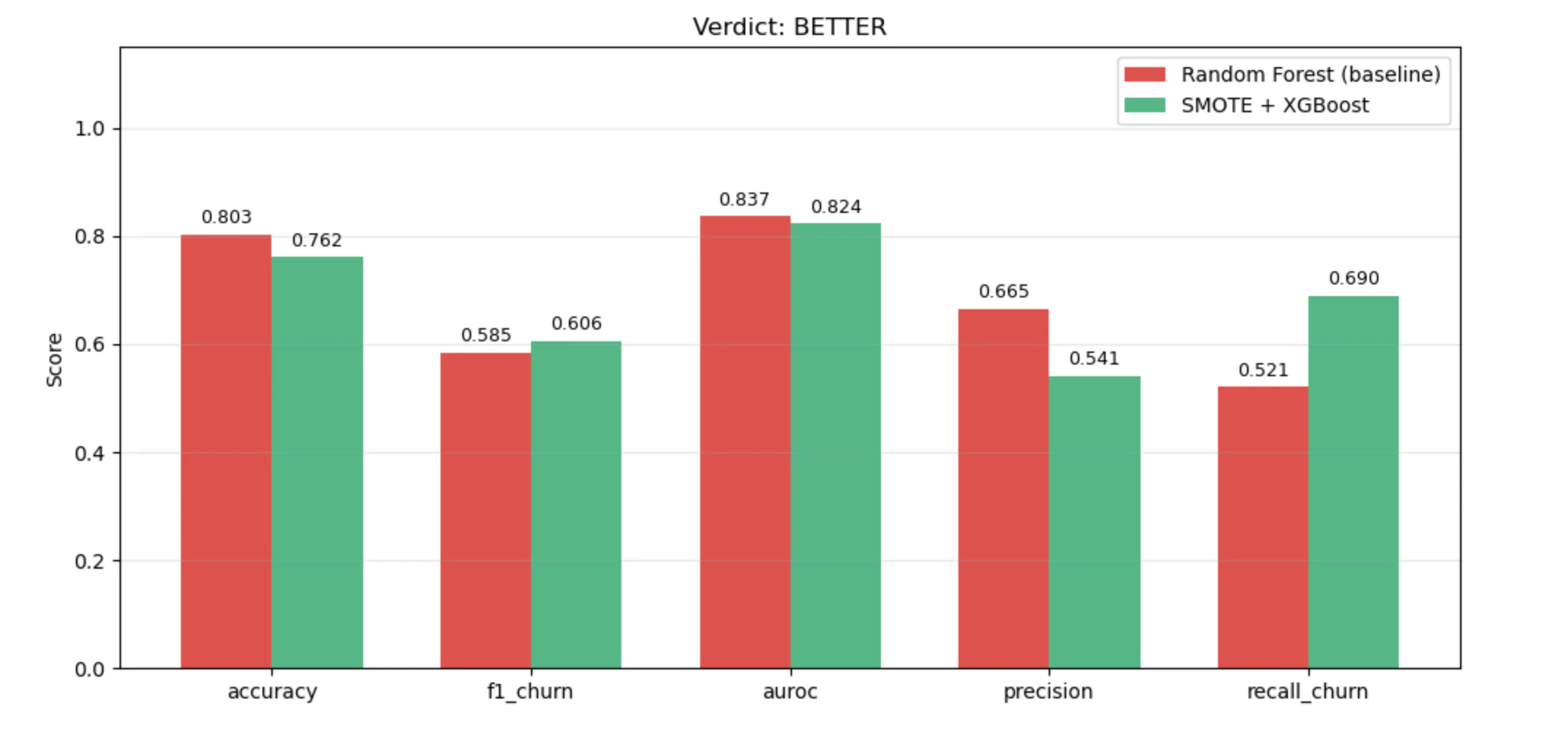
Places the baseline and the new method side by side and issues a verdict: better, worse, inconclusive, or failed. The decision is reported with concrete reasoning and recorded in a shared log so this experiment can be compared against others over time.

Cursor & Claude Code vs Upsonic Prebuilt Autonomous Agents

A question we hear a lot: why use this instead of just doing the same thing in Cursor or Claude Code? The short answer is that those are general coding copilots, and Applied Scientist is a purpose-built experiment runner. The table below shows where the two approaches diverge.
DimensionCursor & Claude CodeUpsonic Applied Scientist
WorkspaceRuns in your working repo, shared with your editorFully isolated workspace folder per experiment
OutputFree-form chat and file editsStructured ExperimentResult (verdict, comparison table, metrics)
WorkflowAssembled case by case in the chatPre-tested, well-designed pipeline
EnvironmentOutside the notebookRuns directly inside Jupyter
Progress trackingScroll through chat transcript to guess where it isLive progress bar driven by progress.json, plus last_logs(n) timeline

Install and Configure

Install the Upsonic package and set the API key for the model you want the agent to use.
!pip install upsonic
import os
os.environ["ANTHROPIC_API_KEY"] = "sk-ant-..."

Requirements

Before you launch a run, you need two things ready on disk — the current notebook and a research source. Everything else is optional.
RequirementWhat it is
Your current notebookA working Jupyter notebook (.ipynb) that trains your baseline model end-to-end. This is the reference point every comparison is made against.
New research sourceAny reference describing the method you want to try against the baseline. The agent accepts local files (PDF, Markdown, HTML, .ipynb, text), web URLs (blog posts, arXiv pages, documentation), GitHub / GitLab / Bitbucket repository URLs (https://github.com/... or git@...), Kaggle notebook or dataset pages, or any other fetchable resource.
Your current data location (optional)Where the baseline data comes from — a file path (CSV, Parquet, etc.), a folder, or a short description of an in-notebook loader (e.g. "downloaded in notebook (ucimlrepo, id=2)"). If you leave it out, the agent opens the notebook itself, locates the data-loading cells, records what it found, and reuses the same loader in the new implementation.

Running an Experiment

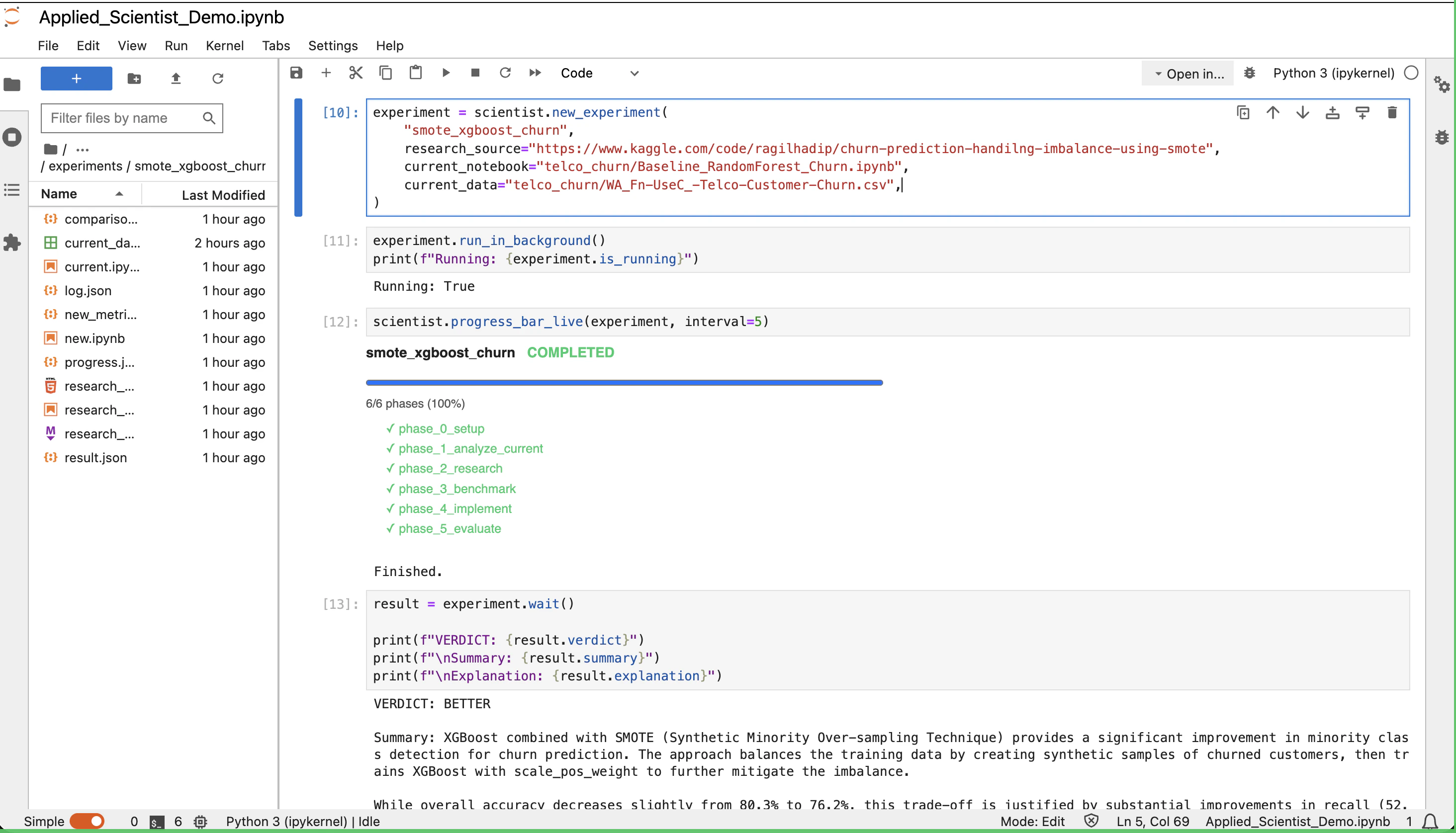
The steps below walk through a full run end to end. Each step maps to a cell in the companion demo notebook.

1. Create the agent

from upsonic.prebuilt import AppliedScientist

scientist = AppliedScientist(
    model="anthropic/claude-haiku-4-5",
    workspace="./autonomous_workspace",
)
The workspace is the root directory the agent is allowed to work in. All experiment folders are created inside it.

2. Prepare the experiment

The first positional argument is the experiment name. It becomes the folder name and the registry key.
experiment = scientist.new_experiment(
    "catboost_adult",
    research_source="example_1/CatBoost Unbiased Boosting Paper.pdf",
    current_notebook="example_1/Baseline XGBoost Adult.ipynb",
    # current_data is optional — omit it and the agent infers the data
    # source from the notebook's loading cells.
)
research_source is polymorphic — the agent inspects whatever you pass and materializes it inside the experiment folder before reading it:
# Local PDF
research_source="example_1/CatBoost Unbiased Boosting Paper.pdf"

# Any other local file
research_source="example_1/method.md"
research_source="example_1/method.html"

# Web URL (blog post, arXiv page, documentation)
research_source="https://arxiv.org/abs/2207.01848"
research_source="https://catboost.ai/docs/en/concepts/algorithm-main-stages"

# GitHub / GitLab / Bitbucket repository
research_source="https://github.com/automl/TabPFN"

# Kaggle notebook or dataset page
research_source="https://www.kaggle.com/code/someuser/catboost-baseline"
research_source="https://www.kaggle.com/datasets/uciml/adult-census-income"

# A free-form idea — no URL, no paper, just a description
research_source="Swap XGBoost for CatBoost with ordered boosting and native categorical handling"
ParameterPurpose
name (positional)Experiment name, used as folder name and registry key
research_sourceReference to the method you want to try. Can be a local file (PDF, Markdown, HTML, .ipynb, text), a web URL, a GitHub / GitLab / Bitbucket repository URL, a Kaggle notebook or dataset page, or a plain-text idea describing the approach to try
current_notebookPath to your baseline notebook
current_dataOptional. A file / folder path or a short description of the notebook’s loader (e.g. "downloaded in notebook (ucimlrepo, id=2)"). When omitted, the agent opens the notebook itself and infers the source from the data-loading cells
experiments_directoryOptional. Where the experiment folder is created (relative to workspace). Defaults to ./experiments

3. Run in the background

run_in_background() starts the run in a daemon thread, silences the agent’s printing, and returns immediately.
experiment.run_in_background()
print("Started.", experiment.name, "| is_running =", experiment.is_running)
Three attributes let you check state at any time:
  • experiment.is_running: True while the thread is alive and has not finished
  • experiment.is_done: True once the run has either succeeded or errored
  • experiment.error: the exception object if the run raised, otherwise None

4. Watch progress

experiment.progress_bar
For a live view that auto-refreshes in place:
scientist.progress_bar_live(experiment, interval=5)
Interrupt the kernel to stop watching without cancelling the run. To see the last few things the agent actually did:
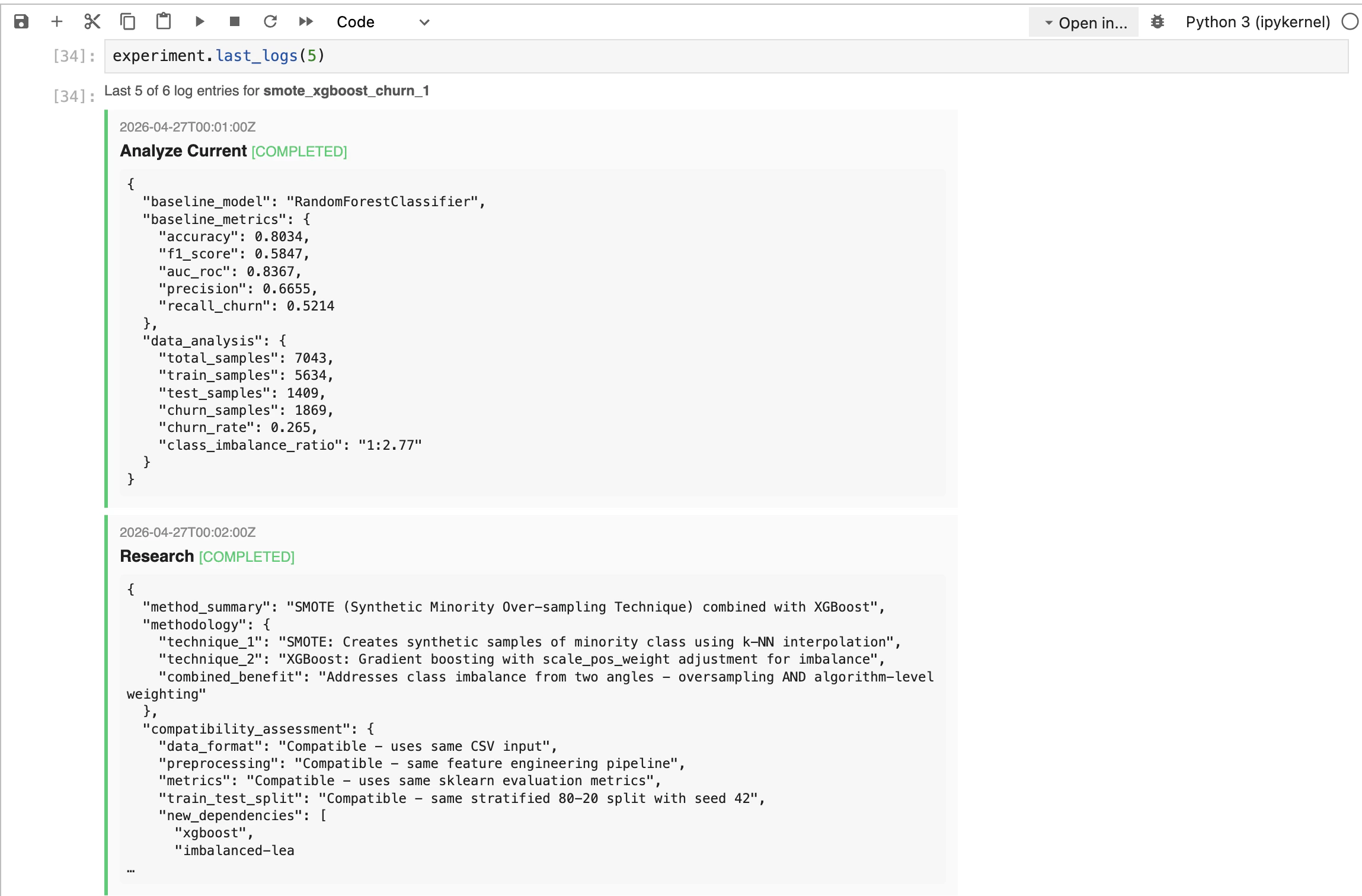
experiment.last_logs(5)

5. Stop or wait

If you change your mind mid-run, stop() requests a cooperative cancel. The agent raises at its next pipeline checkpoint.
experiment.stop()
If you would rather just block until the run finishes:
result = experiment.wait()
wait() returns the ExperimentResult and re-raises any exception the run produced.

6. Read the result

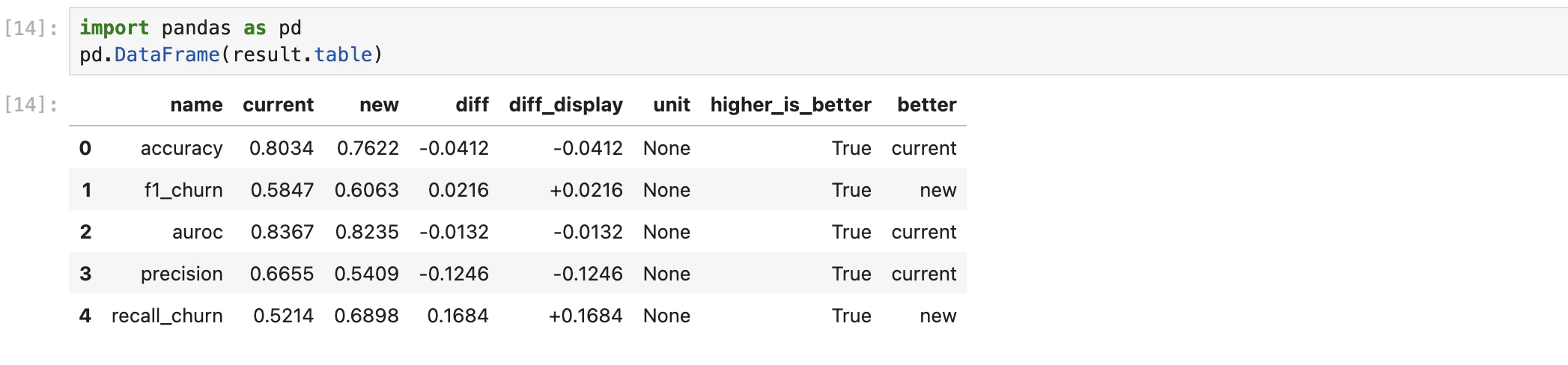
Once the run finishes, experiment.result returns an ExperimentResult parsed from result.json. It renders as an HTML card in Jupyter and also exposes four Python attributes:
result = experiment.result

result.verdict      # 'BETTER' | 'WORSE' | 'INCONCLUSIVE' | 'FAILED'
result.summary      # what the new method is and how it differs from the baseline
result.explanation  # why this verdict was reached, referencing concrete numbers
result.table        # list of metric dicts (name, current, new, diff, better, ...)
Each row of result.table looks like this:
FieldTypeMeaning
namestrMetric name (e.g. accuracy, f1, auroc)
currentfloatValue from the baseline run
newfloatValue from the new method
difffloatRaw difference new - current
diff_displaystrHuman-friendly diff (e.g. +1.2%)
unitstrUnit of the metric
higher_is_betterboolWhether larger values are better for this metric
betterboolWhether the new method won on this metric
If you need the raw JSON files, result.record gives you the underlying ExperimentRecord with access to log.json, progress.json, and registry metadata.

Managing Experiments

Every experiment you create is recorded in experiments.json. The registry is re-read from disk on every call, so it always reflects current state. List every experiment, newest first:

scientist.list_experiments()
Filter by status:
scientist.list_experiments(status="completed")   # 'in_progress' | 'completed' | 'failed'
Each entry is a dict with name, date, status, verdict, baseline_model, new_method, paper, and path. To access an experiment programmatically by name:
exp = scientist.experiments["catboost_adult"]
exp.phases   # normalised phase list
exp.log      # parsed log.json

API Reference

from upsonic.prebuilt import AppliedScientist

scientist = AppliedScientist(model=..., workspace="./ws")

# Create an experiment
exp = scientist.new_experiment(
    "catboost_adult",
    research_source=...,     # PDF, URL, GitHub/GitLab repo, Kaggle page, Markdown/HTML, or a free-form idea
    current_notebook=...,
    # current_data=...,                      # optional, inferred from the notebook when omitted
    # experiments_directory="./experiments"  # optional, this is the default
)

# Run control
exp.run_in_background()   # start silently, non-blocking
exp.is_running            # bool, still alive?
exp.is_done               # bool, finished (ok or error)?
exp.error                 # exception or None
exp.stop()                # cooperative cancel
exp.wait()                # block until done, returns ExperimentResult

# Progress
exp.progress_bar                              # HTML snapshot
scientist.progress_bar_live(exp, interval=5)  # live auto-refresh
exp.last_logs(5)                              # HTML timeline of last N log entries

# Result
res = exp.result
res.verdict       # 'BETTER' | 'WORSE' | 'INCONCLUSIVE' | 'FAILED'
res.summary       # str
res.explanation   # str
res.table         # list[dict]

# Registry
scientist.list_experiments()
scientist.list_experiments(status="completed")
scientist.experiments                         # live dict-like registry
scientist.experiments["catboost_adult"].phases
scientist.experiments["catboost_adult"].log
The full demo notebook for this agent lives in the Upsonic repo under prebuilt_autonomous_agents.